

Import and export reviews
Import reviews
Section titled “Import reviews”If you already have reviews in another app, you bring them in a CSV file. They come in with their stars, their text, their date, their photos and videos, your reply and the verified purchase badge.
- YouYou export from your current appA CSV file with all your reviews.
- Leadit ReviewsWe recognize the formatBy its columns. If we don't recognize it, you tell us what each column is.
- Leadit ReviewsWe show you what comes inHow many, in what status, with how many photos and which rows don't come in.
- Leadit ReviewsWe importThe reviews come in and the photos are copied a few minutes later.
Step by step
Section titled “Step by step”-
In your current reviews app, export your reviews as CSV. Almost all of them have it in their settings or on the reviews screen.
-
In Leadit Reviews, open Reviews → Import reviews and upload the file. Up to 20 MB and 100,000 reviews per file; if it’s bigger, split it into several.
-
Check the format. We recognize the files from the most used review apps on Shopify. If we don’t recognize yours, indicate which column of your file has each piece of data. The minimum: the product (its id or its handle), the rating and the date.
-
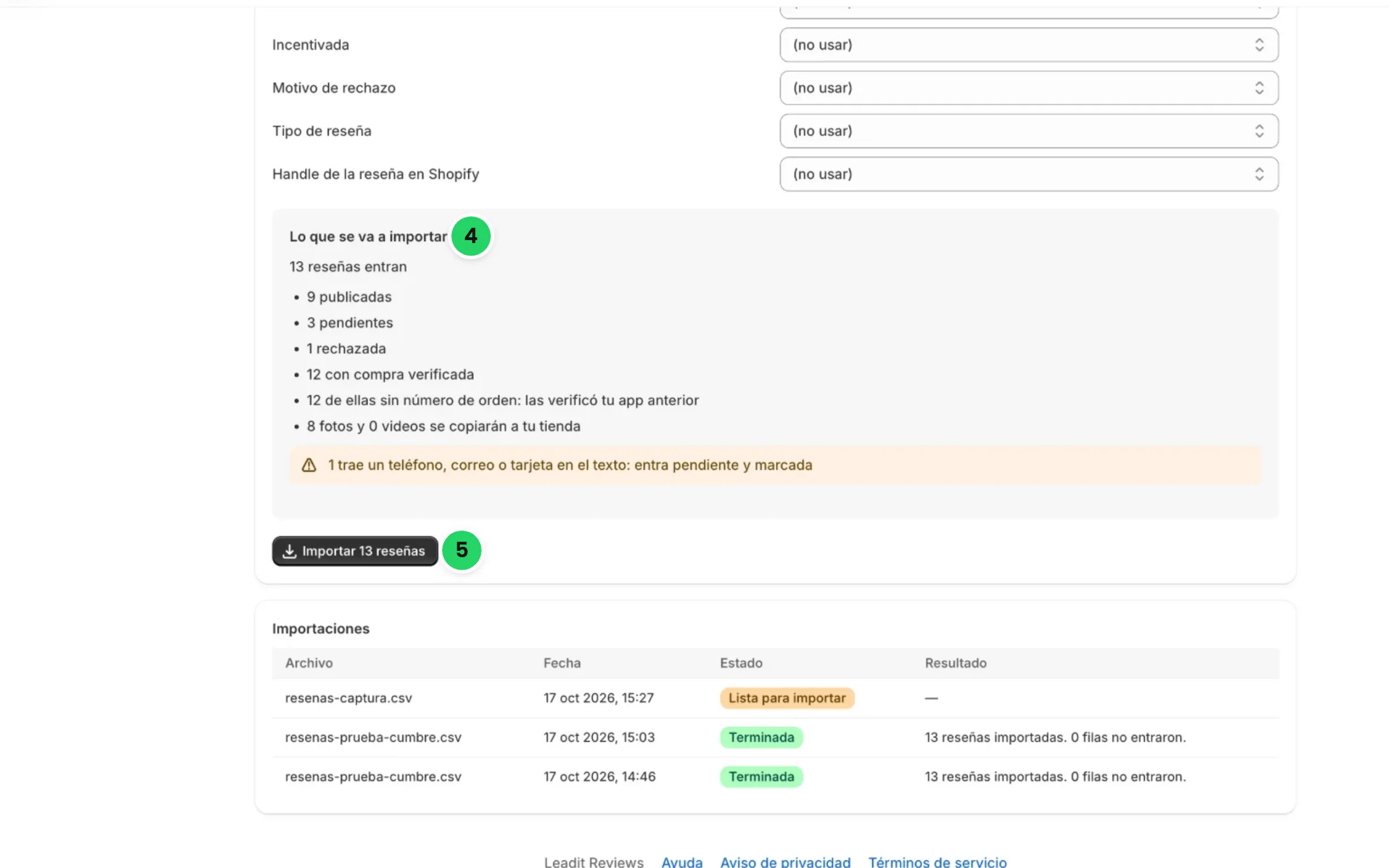
Tap Review file. We show you what’s going to be imported: how many reviews come in, how many published, pending or rejected, how many with a verified purchase, how many photos and videos are copied and which rows don’t come in.
-
Tap Import. The reviews come in within moments; photos and videos keep copying for a few more minutes.
-
When it says Import finished, check the rows that didn’t come in with Download rejected rows. Now you can uninstall your previous app.
What you should know
Section titled “What you should know”- You can upload the same file twice. Reviews that were already imported are skipped: they’re never duplicated.
- We keep the status they had. Published ones come in published; pending ones, pending; rejected ones, rejected.
- We check for personal data. A review with a phone number, an email or a card in the text comes in pending and flagged, even if it was published in your previous app. See Moderate reviews.
- The verified purchase is kept. If your previous app marked it as verified, it stays verified even if the file doesn’t include the order number.
Rows that don’t come in
Section titled “Rows that don’t come in”| Reason | What it means |
|---|---|
| No product | The row doesn’t say which product it’s for. |
| The product no longer exists in your store | You deleted it from Shopify. |
| Store review, not a product review | We only import product reviews. |
| Rating not from 1 to 5 | The rating can’t be read. |
| Unreadable or future date | The date can’t be read or hasn’t arrived yet. |
| Repeated in the file | The same review appears twice. |
| Second review of the same product in the same order | Each order leaves one review per product. |
| That order already has a review for that product | Your customer already left it with Leadit Reviews. |
Export reviews
Section titled “Export reviews”Your reviews are yours. Download them whenever you want from Reviews → Export reviews.
-
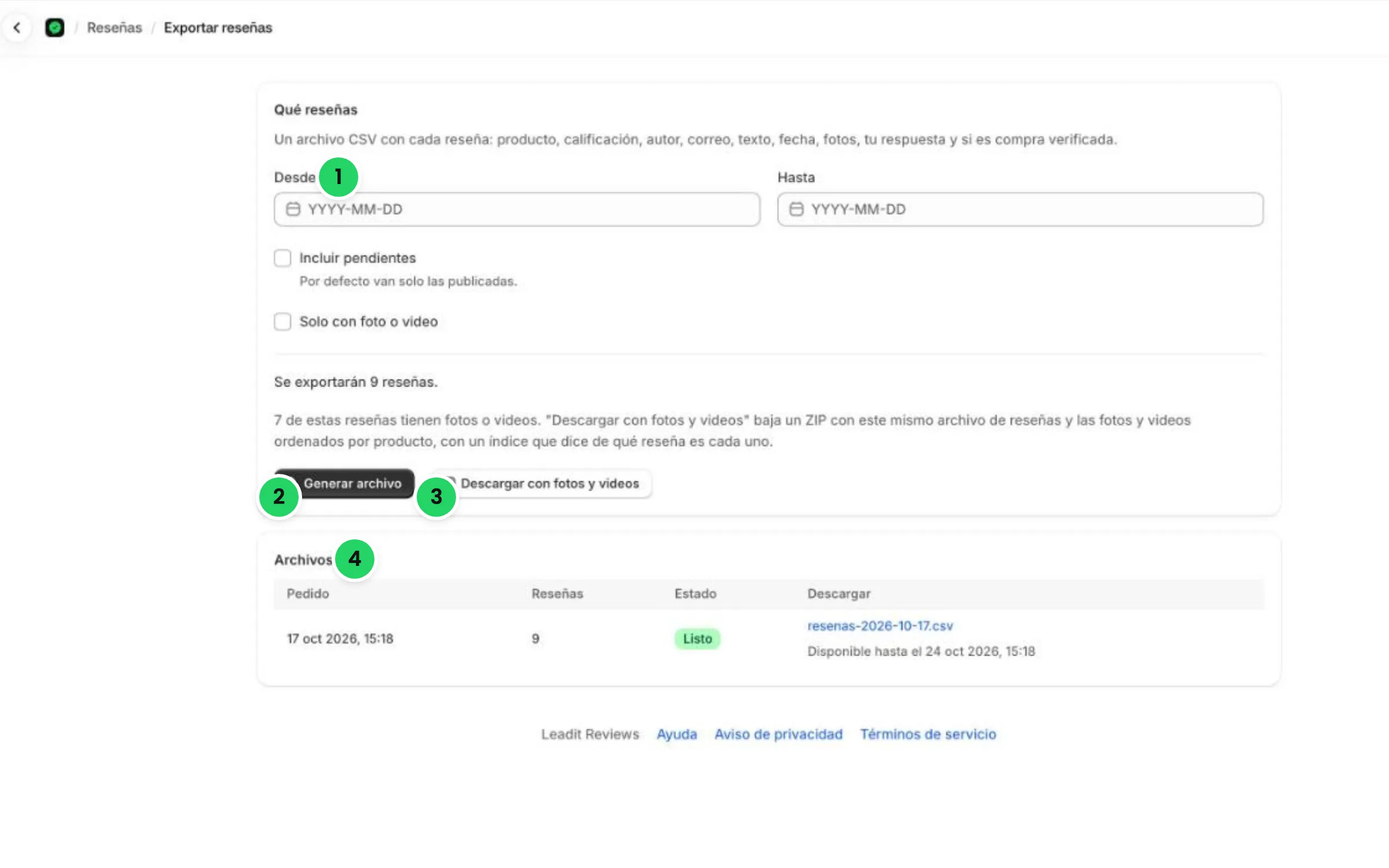
Choose the period with From and To. By default only published ones are included; turn on Include pending if you want those too.
-
Tap Generate file for a CSV with each review: product, rating, author, email, text, date, photos, your reply and whether it’s a verified purchase.
-
Or tap Download with photos and videos for a ZIP with that same CSV, the photos and videos sorted by product, and an index that says which review each one belongs to.
-
The file shows up in Files when it’s ready. Download it: it’s available for 7 days.
The CSV uses columns that other Shopify review apps know how to import, so it also works for taking your reviews with you.
If you uninstall the app
Section titled “If you uninstall the app”- What stays in Shopify: your product reviews, with their rating and their text.
- Deleted 48 hours after uninstalling: everything else, meaning photos and videos, store reviews, rejected reviews, requests and your settings. Photos live on our server, so they also stop showing on the reviews that stay in Shopify.